

In order to connect Lego with the Arduino Yun, you can use the following diagrams.
You might want to play around with the voltage divider.
I just added it to the circuit and have not tested if the values of the resistors are right.
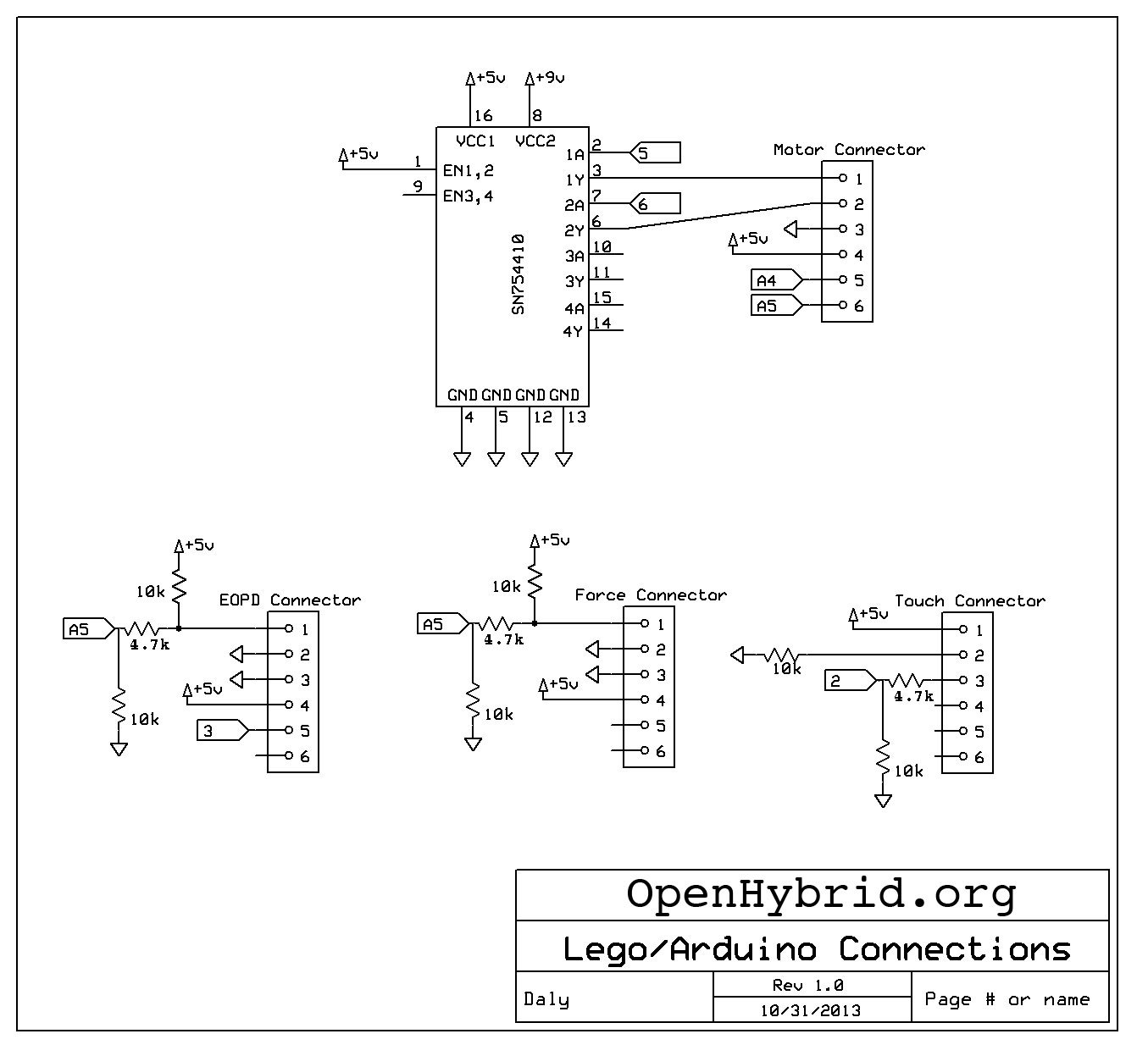
The Motor needs to connect to an H-Bridge. We found the SN754410 very useful. A good example for how to use an H-Bridge with the Arduino can be found here: http://itp.nyu.edu/physcomp/labs/motors-and-transistors/dc-motor-control-using-an-h-bridge/ 63
The other simple sensors need a certain wiring but then they can be read just as an analog sensor (EOPD, Force), or a push button (Touch).
As you can see the Diagramms are from 2013. We used EV3 Motors, but all the Sensors are from a previous generation of Mindstorms or from https://www.hitechnic.com 27
The EV3 Sensors have a data bus implemented. It is more difficult to connect with them.
created
Aug '15last reply
Jul '16- 2
replies
- 6.8k
views
- 2
users
- 2
links
