This forum is a read-only archive. Posting, accounts and search are no longer available.
1 / 25
Mar 2016

I noticed, that you can only add image targets and not cylindrical ones. Is there a reason for that?
Additionally this part in server.js 1 doesn’t make sense to me:

 var documentcreate = '<?xml version="1.0" encoding="UTF-8"?>\n' +
                                '<ARConfig xmlns:xsi="http://www.w3.org/2001/XMLSchema-instance">\n' +
                                '   <Tracking>\n' +
                                '   <ImageTarget name="' + objectName + '" size="300.000000 300.000000" />\n' +
                                '   </Tracking>\n' +
                                '   </ARConfig>';

It creates a target.xml when the target.jpg is uploaded. But this file gets overriden when the target.zip file is uploaded. So why create it in the first place?

EDIT:
Ok, after some hacking to allow cylindrical targets I see that it’s difficult because the z axis mapping has to be taken into account. I would like the z axis to be orthogonal to the side of the cylinder and x and y to be the height/width of the cylinder which is probably quite difficult to map into the RealityEditor coordinate system…

I think one of the major addition to reality editor that @valentin has planned is the use of 3D objects directly as tarrgets
It would be very nice :slightly_smiling:

@V_Mohammed_Ibrahim I have no near plans for this.

I could implement a z-aches manipulation in to the editor.

It could be implemented with activating the z-Achses in the settings and then when you move the interface with a finger the distance of the iPhone to the target will be used to change the z-aches of the UI.

Would that help?

I’m not sure I understand what you mean. When you want to change the z-axis of the UI by using the distance to the target do you mean you want to change the z-value or do you actually want to move the z-axis around and change its orientation?

What I actually want to do is the following:
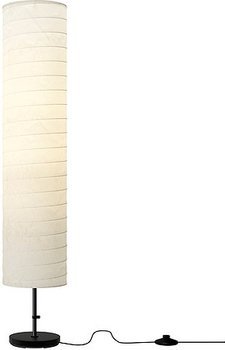
I have a lamp similar to the one below and I want to wrap my marker around it. The UI should appear regardless of the direction from which the IPhone is pointed at the lampshade.

The detection part works. Vuforia is able to detect the target, but because the vuforia z-axis is pointing upwards (see below) and the RealityEditor’s z-axis is orthogonal to the display’s x-y-plane, the WebUI is rendered onto the top of the lamp and not onto the lampshade. This means when you point the IPhone at the lampshade you see the z-x- or z-y-plane of the WebUI. That’s rather flat, because my WebUI doesn’t contain any z-information :slightly_smiling:

Maybe it would work if i flipped the z and y axis of my WebUI…

P.S.
The code part mentioned in my first post still doesn’t seem to make sense

I think what I have in mind is:
When you touch the screen, the UI element locks with your screen/finger in 3D Space.
The UI element will always stay in the the same distance relative to your iPhone->Screen->Finger and therefore when you move your iPhone you can change XY and Z position and XYZ rotation relative to the marker.
It will help you to have more freedom in positioning your UI elements still intuitively. I would add a new button called “unconstrained Positioning” or something like that to activate this functionality and a reset button for when you messed up.

With the “unconstrained Positioning” we could then also have buttons pop up that allow to activate which of the XYZ translation and XYZ rotation is going to be updated by the marker position.
For your example I think you would only want to deactivate the Z rotation.
(We are getting close to a serious 3D editor here :smiley: )

Wow, yes that would be it. Sounds great and I think it would be a nice-to-have feature and give you even more freedom in positioning UI elements.

Can you tell what you did to make the cylindrical marker work?

The target.xml file that is generated with the jpg image is for creating a default reference file for the target.
The Reality Editor and the Open Hybrid platform needs this xml file to handle the marker.
The default generated file is for future use cases, where the jpg images could be used as a reference directly.

At this point it is simply overwritten by the xml file provided with the vuforia marker, and as such there is no use at the moment.

<?xml version="1.0" encoding="UTF-8"?>
<QCARConfig xmlns:xsi="http://www.w3.org/2001/XMLSchema-instance" xsi:noNamespaceSchemaLocation="qcar_config.xsd">
  <Tracking>
    <CylinderTarget name="Light1Nysls91co7bk" sideLength="300.000000"/>
  </Tracking>
</QCARConfig>

To enable it I did a quick and dirty hack in HybridObjectsUtilities.js:

exports.getObjectIdFromTarget = function (folderName, dirnameO) {
    var xmlFile = dirnameO + '/objects/' + folderName + '/target/target.xml';

    if (fs.existsSync(xmlFile)) {
        var resultXML = "";
        xml2js.
            Parser().
            parseString(fs.readFileSync(xmlFile, "utf8"),
            function (err, result) {
                for (var first in result) {
                    if (typeof (result[first].Tracking[0].ImageTarget) !== 'undefined')
                        resultXML = result[first].Tracking[0].ImageTarget[0].$.name;
                    else if (typeof (result[first].Tracking[0].CylinderTarget) !== 'undefined')
                        resultXML = result[first].Tracking[0].CylinderTarget[0].$.name;
                    break;
                }
            });

        return resultXML;
    } else {
        return null;
    }
};

After that it detected the marker and displayed the UI but with the messed up orientation.

I think the hack seems to be the solid solution.

I am not quite sure how long I need to program the unconstrained editing.
It feels like 4 lines of code in the MultiTouch function, but when ever I touched the 3D positioning it turned out to be a 1-2 weeks problem. That is related to these translations openGL ↔ css 3D transform ↔ 2D screen.

The z-translation is super easy. The xyz-rotation needs a bit more time.

If anyone else reading this forum has know how in 3D graphics programming. Feel free to join the coding conversation. :slightly_smiling:

I think the hack is a bit ugly because there are other possible types apart from ImageTarget and CylinderTarget. So we would either have to add an if for each of those or do something like result[first].Tracking[0].getChild().$.name; I don’t know if there actually is something like getChild(), but it would be worth finding out, I think.

I like the test for each target type.
There are only a limited amount of types and in case we need individual additional handling or specific user feedback, your hack allows it.

Done :slightly_smiling:

I have implemented the unconstrained editing and a reset button.
All in all it will be part of the next update.
That update will then also have a faster javascript engine as we switched from UIWebView to WKWebView.

I needed to make changes to the server code to allow the unconstrained editing to be saved.
It is all backward compatible but the unconstrained editing will not be saved to the older versions.

12 days later

@valentin I would like to integrate this feature into my editor fork. Which branch will I have to merge? Do I have to wait for the update or can I just merge it and run it right away?

You committed the changes to the server code directly into the master branch and not into the beta_hardwareInteraces branch, right?

Hi Carsten,
I just pushed a new version to the editor/master branch.
It should be compatible with your reality editor again.

I made changes to the protocol between the app and the javascript so that I could hand over the acceleration data.
However I just found out that you can access the acceleration data from within javascript directly.
So there is no need to pass this over in a complicated way.

Short:
Just use:

I also made changes to the beta hardware interface branch so that it can save the unconstrained edits:
https://github.com/openhybrid/object/tree/beta_hardwareInterfaces 2

Not yet, the settings button of the RealityEditor vanished. Don’t know yet if that is because I made some mistake during merging it into my own code or something else…

I’ll keep you posted.

EDIT:
Got it :slight_smile: Somehow one line got messed up during merge.

@valentin when I click “Authoring Position UI” in the preferences I see the new “Reset” Button and another button which I suppose enables the unconstrained editing. But when I click it nothing in the positioning behavior changes. Are there any special gestures or how do you position something?

@Carsten Could you try to use the editor/master first without any modifications, so that you can see what should be happening?

I made changes all over the code and files for this to work. If you can not see what is happening it is most likely that it is not working. The unconstrained editing is not different from the normal editing, only that the position of your phone makes a different as well.

Ok, it works I had just been too stupid to use it :slight_smile:

According to Don Norman there is no stupid user only stupid design. :wink:
What was it that you thought it should do but did not?

I thought you could turn the UI with some gesture, but instead you simply touch the UI and turn the IPhone. I think I am too used to manipulating things on the phone with gestures. And well, I expected that you had to directly manipulate the UI to position it but instead you have to “fix” the UI’s position by touching it and move the surrounding “coordinate system” by moving the Phone.

Do you think that the interface is intuitive?
If you would use gestures, you would need to separate gestures for

  1. X and Y
  2. Z
  3. Rotation X and Y

With locking in the phone you have all of it in one at hand.

(This is actually an interesting discussion we can have about gestures vs real world interaction)

After you have understood that you have to move the Phone to position the UI it’s quite intuitive. But first you have to understand that and I think it is not obvious that you can “lock” the position of the UI by touching it. In the RealityEditor application the camera is kind of used as “glass pane”. When you look at the screen you see the real world behind it. And when I, as a real world person, move my point of view a real world object’s position stays fixed and because I expected the augmented UI elements to behave like real world objects I didn’t even get the idea to move the phone to position the UI :slightly_smiling: Additionally I was used to position the UI element by touching and moving it in some kind from the time before this new feature was added. This new mode sort of reverses the positioning paradigm - instead of moving the UI you now have to move the Phone.

You are right about the gestures. That wouldn’t be intuitive and more complicated. You would have to explain the gestures somewhere. So I think that your solution is quite good but it would be even better if you could immediately understand that you have to move the Phone to position the UI. I have got no idea how to make it more obvious though :slight_smile:

Maybe some short video explaining it? :smiley:

Other then that you use the motion of the phone in another context.
When you draw a line from one data point to another data point of an object outside of the screen.
You lock in the one end on the screen and you move it to another data point.

I think it is interesting to think about the vocabulary of gestures used and how to keep them minimal.
I think the log in and use the phone in space, is a powerful one.

Yes a video will do :slight_smile: But it would be even better if you could understand it right away without any instructions from outside the actual application.

I’ve got to admit I don’t get this paragraph :wink: Are you saying you think the “lock feature” (we really have to give it a name :slight_smile: ) is similar to drawing a connection between IOPoints? I don’t see that.

Yes, I agree. This “lock feature” is really cool. Once you have understood it you can do a lot with it. I will experiment with it in the next couple of days and try to use it for my cylindrical lamp shade marker. I’m excited to see if I can get the UI positioned as I wish. I only gave it a quick try today.

Yeah and I think it’s always good to discuss which gestures we have, which gestures we actually need and which gestures are missing or which could be improved or replaced. I think It would be cool to get some feedback from people actually only using the RealityEditor who are not so involved in developing. That could open a new perspective on things.